The next version of the Benefits Assistant is ready for busy season
Busy season 2025 was Brite’s Benefits Assistant’s first year in action. Since its launch, our team has learned something about employees and their benefits guide: give them a way to ask instead of read, and they'll ask a lot. From enterprise examples to smaller employers, thousands of questions were asked. Most of them led to a proper resolution and never required HR, the rest were escalated to the a proper channel.
As we reviewed results and interacted with it ourselves during Brite’s OE, we found opportunities to improve 1) the convenience of asking effective questions and 2) consumability of the assistant’s responses. Our first versions did it with text where you ask a question and receive a paragraph in return. That's fine for "what's my deductible" and not fine for "which of these three plans should I pick" or "what does this sentence mean". And once the season ended, supporting HR and Broker teams had no way to see what had been asked, what landed, or where the guide had left people confused.
Starting today, the Assistant answers in whatever form gets an employee to a confident decision, and shows HR what happened along the way.
What employees get
Answers you can see. Ask about one plan and get a clean summary. Ask about several and get them side by side. Deductibles, premiums, out-of-pocket maximums, laid out as a table instead of a paragraph to untangle. The written explanation is still there. The table just gets you to the answer faster.
Answers you can hear. Tap Read Aloud on any response and the Assistant reads it. Tap it on one plan inside a comparison and it reads just that plan. Paced for benefits language, pauses around the numbers, in English and Spanish. For employees who'd rather listen or who can't easily read the screen, the Assistant finally works for them too.

Ask about the exact thing you're reading. Highlight any sentence in the guide, or hover any plan card, and choose Ask the Assistant. The selection travels with your question. "What does this mean" works without retyping anything, and it works in the two seconds before you would have given up and emailed HR.

A recommendation that explains itself. Since June, employees can complete the Recommendation Tool inside the chat. Now the result comes with its reasoning: which of their answers mattered most, how the recommended plan compares to the ones it didn't pick, and what would change if their situation did. Ask "why not the HDHP" or "what if we have a baby next year" and get a real answer. Available where the Recommendation Tool is turned on.

Bring the other document with you. The real decision usually involves a spouse's plan, and the Assistant could only ever see one side. Now an employee can upload the spouse's plan summary and ask "which one is better for our family". It works for an EOB or an HSA statement too. The file is used for that conversation and nothing else. When the conversation ends, it's gone.
What HR and brokers get
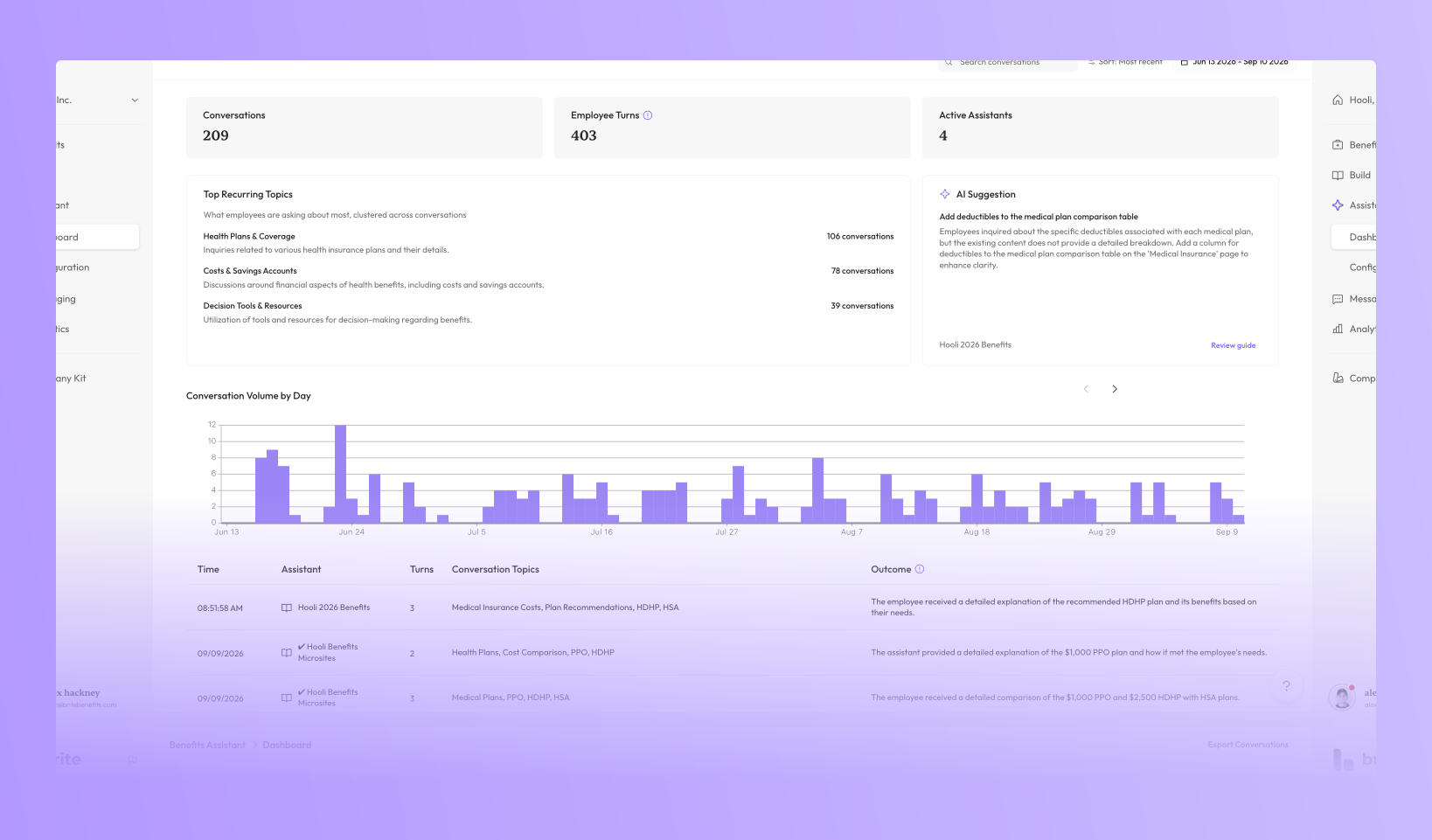
The Questions Ledger. Until now the Assistant was a black box. You knew employees were using it, but the only way to learn what it was saying was to open it and test. The Ledger shows how many questions employees asked, how they reacted to the answers, and which topics keep coming up. From those topics, it suggests where the guide is thin and what to add or fix. Nothing in it identifies an individual employee.

Any conversation, in full. Open a conversation and read the actual exchanges between the Assistant and employees. Review what the employee asked, how the Assistant answered, and which pages of the guide it pulled from. It's the quickest way to dig deeper into what employees care about, and how they feel toward their experience with your Assistant

Built to be trusted with the front line
Every answer still cites your guide. There's still no login and no personal information collected. And the Assistant knows which questions aren't its to answer. Operational questions route to HR with a clear hand-off. If someone is in distress, it points them to your EAP and to crisis resources before anything else, and that conversation is never stored. If an employee shares something the Assistant shouldn't have, the same thing happens. The Ledger only ever shows what should be there.
Small things that add up
The Assistant now shows its work while it thinks, so employees see it searching the guide instead of a blank box. It suggests questions based on the page they're on. The chat input follows them from page to page. And a recommendation started in the chat can be picked up days later without starting over.
Getting started
For customers with access to the Assistant, all of this is on and available with nothing to enable. For a deeper dive into everything new, you can reach out to your assigned Customer Success Manager or email support@britebenefits.com.
If you don't have the Assistant yet, this is a good season to find out what your employees have been wanting to ask. Sign up through your Customer Success Manager by November 13th and the rest of 2026 is free. The one-year contract starts at signing.