Benefit Package Redesign & New Enhanced Smart Import
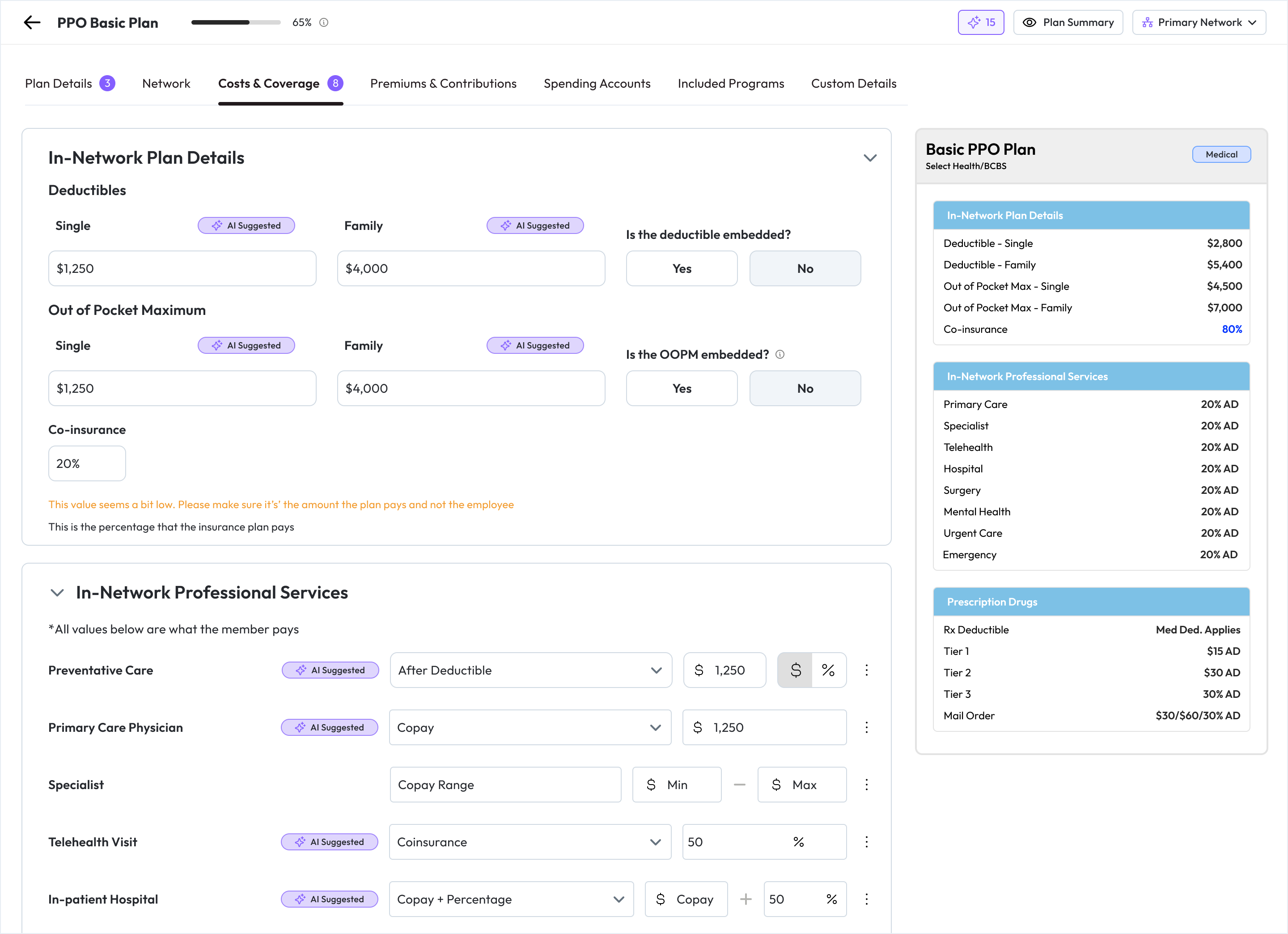
Getting benefit details into Brite just got a whole lot smoother. We know importing plan data has been one of the most time-consuming steps. This release focuses on making it faster, more accurate, and easier to manage.
How to Update
To make the update, navigate to the “Benefits” tab in Brite, open up a Benefits Package, and click the “Update” button. All of your benefit packages (both new and existing) will be updated to the new UI, and any imported files will utilize the latest Smart Import functionality.

IMPORTANT NOTE
The new Smart Import works exceptionally well when importing PDFs, such as Benefit Summaries, SBCs or even last years PDF guide. The AI technology still struggles with spreadsheets, so you can expect to see extremely high accuracy with PDFs and moderate to high accuracy with spreadsheets.
What’s New
Improved Smart Import
We’ve upgraded our AI import to recognize plan values in your PDFs better. Try importing the Benefit Summary PDF from carriers or last years Benefit Guide PDF as a starting point! More accuracy, more fields identified—less manual cleanup.
Human-in-the-Loop Import Review
After you upload the file, you’ll see all detected plans. Select which plans to import, and correct any details, such as plan type. Then click “continue,” and we’ll only bring in details from the plans you chose.
Simpler, Faster Data Entry
Say goodbye to endless scrolling. The product form now uses tabs for quick navigation, with the employee-facing plan summary broken into smaller, relevant previews. When using the “smart import” feature, each field identified by our AI importer will be highlighted with an “AI Suggestion” pill. Click on this to accept or reject the value.
Automatic AI Suggestions
AI-suggested values are now placed directly into fields (highlighted for visibility). No more clicking “accept” one by one—just review and move on.
What’s next? The Review Modal
This is the game-changer. Instead of hunting through tabs to find the AI suggestions, flagged fields or empty fields, the Review Modal brings everything together into one place. In a single view, you can:
See all AI-suggested fields
Find flagged values that need your attention
Spot and fill in any empty fields
Once you’ve reviewed, you can finalize the plan with confidence—fast, clean, and complete.
Why It Matters
These changes save you time, reduce errors, and streamline the import process, allowing you to focus on what really matters: building engaging, employee-friendly benefit guides.